Thursday, 19 July 2012

Delete Target Table in ODI Substitution parameters


Delete Target Table

This task deletes the data from the target table. This command runs in a transaction and is not committed. It is executed if the DELETE_ALL Knowledge Module option is selected.
Command on Target


delete from <%=odiRef.getTable("L","INT_NAME","A")%>

ODI Oracle Tools Send Mail Example


Oracle Tools Send Mail Example

Procedure Details for Sending Multiple Emails
Source Technology
Oracle
Source Logical Schema
ORACLE
Source Command
Select FirstName FNAME, EMailaddress EMAIL
From <%=odiRef.getObjectName("L","USERS","D")%>
Target Technology
ODITools
Target Logical Schema
None
Target Command
OdiSendMail -MAILHOST= tgrtechnologies.com  -FROM=admin@tgrtechnologies.com “-TO=#EMAIL” “-SUBJECT=Job Failure”
Dear #FNAME,
This is sample program in TGR Technologies, because session <%=snpRef.getSession(“SESS_NO”)%> has just started!
-Admin

OD Substitution methods Parameter pProperty:


Parameter  pProperty:


    ID:Datastore identifier.

    TARG_NAME:Full name of the target datastore. In actions, this parameter returns the name of the current table handled by the DDL command. If partitioning is used on the target datastore of an interface, this property automatically includes the partitioning clause in the datastore name.

    RES_NAME:Physical name of the target datastore. In actions, this parameter returns the name of the current table handled by the DDL command. This property does not include the partitioning information.

    COLL_NAME:Full name of the loading datastore.

    INT_NAME:Full name of the integration datastore.

    ERR_NAME:Full name of the error datastore.

    CHECK_NAME: Name of the error summary datastore.

    CT_NAME: Full name of the checked datastore.

    FK_PK_TABLE_NAME:Full name of the datastore referenced by a foreign key.

    JRN_NAME:Full name of the journalized datastore.

    JRN_VIEW:Full name of the view linked to the journalized datastore.

    JRN_DATA_VIEW:Full name of the data view linked to the journalized datastore.

    JRN_TRIGGER:Full name of the trigger linked to the journalized datastore.

    JRN_ITRIGGER:Full name of the Insert trigger linked to the journalized datastore.

    JRN _UTRIGGER:Full name of the Update trigger linked to the journalized datastore.

    JRN_DTRIGGER:Full name of the Delete trigger linked to the journalized datastore.

    SUBSCRIBER_TABLE:Full name of the datastore containing the subscribers list.

    CDC_SET_TABLE: Full name of the table containing list of CDC sets.

    CDC_TABLE_TABLE:Full name of the table containing the list of tables journalized through CDC sets.

    CDC_SUBS_TABLE:Full name of the table containing the list of subscribers to CDC sets.

    CDC_OBJECTS_TABLE:Full name of the table containing the journalizing parameters and objects.

    <flexfield_code>: Flexfield value for the current target table.

One Example For Substitution Methods


One Example For Substitution Methods
Procedure Details for Loading Data from a Remote SQL Database
Source Technology
Oracle
Source Logical Schema
SOURCE
Source Command
select ENAME V_ENAME,EMPNO V_EMPNO
from   <%=odiRef.getObjectName("L","SCOTT","D")%>
Target Technology
Teradata
Target Logical Schema
TERADATA_DWH
Target Command
insert into PARTS
(ENAME,EMPNO)
values
(:V_ENAME,:V_EMPNO)

Saturday, 14 July 2012

ODI Substitution Parameters L,W,D,P,S usage and meanings


ODI Substitution Parameters L,W,D,P,S usage and meanings

Parameter pMode

L:
use the local object mask to build the complete path of the object.


 R:

Uses the object mask to build the complete path of the object.
use the remote object mask to build the complete path of the object.

Note: When using the remote object mask, getObjectName always resolved the object name using the default physical schema of the remote server.

A:

 Automatic: Defines automatically the adequate mask to use.

 Parameter Location

   W:

Returns the complete name of the object in the physical catalog and the "work" physical schema that corresponds to the specified tuple (context, logical schema)

    D:
Returns the complete name of the object in the physical catalog and the data physical schema that corresponds to the specified tuple (context, logical schema)

A:

Lets Oracle Data Integrator determine the default location of the object. This value is used if pLocation is not specified.

    P:

Qualify object for the partition provided in pPartitionName

    S:

Qualify object for the sub-partition provided in pPartitionName

Wednesday, 11 July 2012

ODI Console Configuration part 2


ODI Oracle Data Integrator 11G Step by Step Installations on Windows 7

ODI 11G Step By Step Installations on Windows 7

Download ODI 11G (11.1.1.6) latest version from oracle.

extract two zip folders (disk1 and disk2) in you OS.


Select first and second options.

If you installaed WEB Logic Server select option 3 ( Java EE Installation) other wise deselect .
If you select Java EE installation option you will get this option.


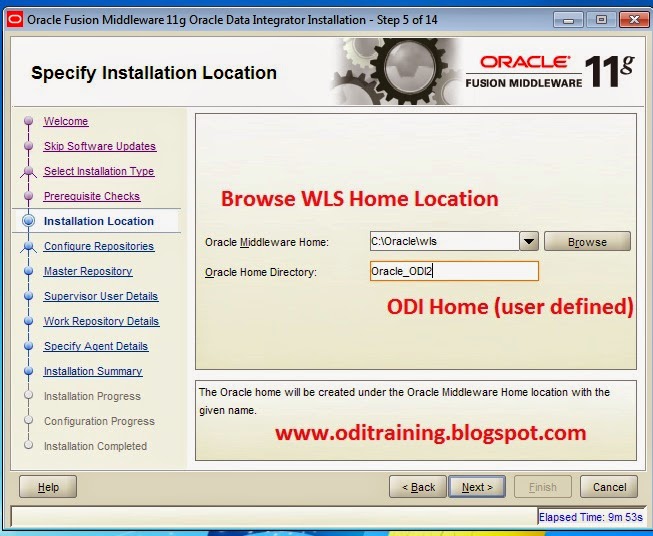
select your Web logic Middle ware home location ex  (C:\oracle\middleware) and Oracle Home Directory keep it default


Your installations was successfull.

Go to Program Files=> oracle=> open ODI Studio

Go to File => NEW=>select master repository creation.