Sunday, 9 September 2012

ODI-1551: The dbms_lock acquisition failed with a sql exception 'ORA-06550:

ODI-1551: The dbms_lock acquisition failed with a sql exception 'ORA-06550: line 1, column 7:
PLS-00201: identifier 'DBMS_LOCK' must be declared.

This issue you will get while running load plans.

Solution:
-----------
Grant  execute privileges on dbms_lock to ur schema( DB user for your work repository).


ex:

my schema name is :  ODI. (My Work Repository db user)


GRANT EXECUTE ON DBMS_LOCK  TO ODI;


ODI-1227 : Invalid Fetch Size while loading data from microsoft xls to oracle

ODI-1227: Task SrcSet0 (Loading) fails on the source MICROSOFT_EXCEL connection ODI_EXCEL.
Caused By: java.sql.SQLException: Invalid Fetch Size

 This is 11g bug.

so u can download the patch from oracle support (p12798243_111150_Generic)or

Follow the below solution.

 Solution:
-----------------

Goto => Physical Architecture =>Technologies=> Microsoft Excel=>Data Server

ex: i have created MOCROSOFT_EXCEL data server

open data server and change the Arry Fetech Size to zero (0).


How to find the all the task wise status after running your interface?

How to find the all the task wise status after running your interface?

OR

What are the tasks status available in sessions logs.?


------------------------------------------------------------------------------------

Using SNP_SESS_TASK table we can find the all the tasks status.

'D' - done

'E' - error
'M' - warning
'R' - running
'W' - waiting

How to find the no of records processed after running your interface?

How to find the no of records processed after running your interface?
------------------------------------------------------------------------------------

Using SNP_SESS_TASK_LOG table we can find the no of records processed.
TASK_DUR - Total duration
NB_ROW - number of processed records
NB_INS - number of insertion
NB_UPD - number of updates
NB_DEL - number of deletions
NB_ERR - number of error-out records.

Sunday, 22 July 2012

Oracle Data Integrator Interview Questions and answers?

Oracle Data Integrator Interview Questions and answers?

1) What is the history of ODI?
2) What are the types of Knowledge Modules?
3) What are the types of data contol?
4) What is Journalization and why we are using in ODI?
5) Tell me step by step to enable Journalization?
6) What is An Interface ?
7) What is temporary Interface( Yellow Interface) ?
8) Tell me some differences between ODI 10g and ODI 11g?
9) Tell what are the ODI tools have u used in your project?
10) What are the Types of repositories in ODI?
11) Can i create more than one Master Repository in ODI?
12) What is a scenario in odi?
13) What is load plan and types of load plans in ODI?
14) What is CKM and when we will use this CKM?
15) What is SKM and when we will use this SKM?
16) What is package and main advantages?
17) Differences between package and loadplans?
18) How to load data from multiple files to single target?
19) How to load data from file to file and what are the KM's required for this requirement?
20) how to pass a variable more than one values?

21) What is an agent and What are the types of agents?
22) What is StandAlone Agent and default port number?
23) What is J2EE Agent and port number?
24) What is the use solutions?
25) What is flexfileds and use of flexfileds in odi?
26) What is CDC and explain complete CDC process flow?
27) What are the types of profiles in ODI?
28) What are the types of Generic profiles types in ODI?
29) Which profile required to access Models in Designer tool?
30) Which profile required to access solution in Designer tool?
31) Which profile required to access ODI Console?
32) What is ODI console?
33) What are types of LOG LEVELS in ODI?
34) What is the use of Markers?
35) What is memo?
36) How to move objects from DEV to QA and QA to PROD Environments?

Thursday, 19 July 2012

ODI 11g StandAlone Agent Configuration step by step

Goto Your ODI Agent Bin Installation directory

like

C:/oracle/Middleware/oracle_ODI1/oracledi/agent/bin

edit odiparams.bat for windows


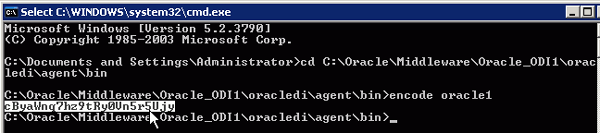
 Goto CMD prompt and open below path


C:/oracle/Middleware/oracle_ODI1/oracledi/agent/bin

 using encode generate your password
encode oracle1( oracle1 is password) password is encoded


mark encoded password for both SUPERVISOR and Master Repository Passwords


Create agent for Standalone and portno 20910 default no
and 


ODI 11G J2EE Agent step by step Configuration in WLS Part 2

Create new physical agent   "OracleDIAgent" like the same


Goto CMD prompt and open your WLS installed drive ex
C:/oracle/Middleware/oracle_common/common/bin

Type wlst and enter


it will connect wlst


execute the following command:

connect('weblogic','Admin123','t3://localhost:7001') 

weblogic user name and password and host and port number

and enter


Execute the following command to add the correct credential store for ODI Supervisor :

 createCred (map="oracle.odi.credmap", key="SUPERVISOR", user="SUPERVISOR", password="welcome", desc="ODI SUPERVISOR Credential").


IAlso execute the command to add the correct credential store for the domain ODI-DOMAIN :


createCred (map="oracle.odi.credmap", key="ODI-DOMAIN", user="weblogic", password="Admin123", desc="ODI-DOMAIN Credential"). 


exit and start your weblogic domain services

and goto ODI Topology admin and open OracleDIAgent and test