Showing posts with label SCD IN ODI. Show all posts

Sunday, 3 August 2014

Implementing SCD Type 2 and Flow Control in ODI 11G or 12c

Implementing SCD Type 2 and Flow Control in ODI 11G or 12c.

Solution for insert PK errors in Control step. 


ODI-1228: Task SCD2 (Control) fails on the target ORACLE connection TARGET_DS.
Caused By: java.sql.SQLSyntaxErrorException: ORA-00904: "SUB"."DIM_EMP_ID": invalid identifier


In SCD2 table DIM_EMP_ID Surrogate key data we are inserting using Sequence. This column data
we are not receiving from source, directly we are inserting using Sequence.  But In Flow Control
It will considar Data Quality check at E$Table.

insert into TARGET."E$_15022SCD2"
(
    ODI_PK,
    ODI_SESS_NO,
    ODI_ROW_ID,
    ODI_ERR_TYPE,
    ODI_ERR_MESS,
    ODI_ORIGIN,
    ODI_CHECK_DATE,
    ODI_CONS_NAME,
    ODI_CONS_TYPE,
    EMPNO,
    ENAME,
    JOB,
    MGR,
    HIREDATE,
    SAL,
    COMM,
    DEPTNO,
    FLAG_STATUS,
    START_DATE,
    END_DATE
)
select    SYS_GUID(),
    15022,
    rowid,
    'F',
    'ODI-15064: The primary key PK_DIM_ID is not unique.',
    '(5022)DEV.In SCD2 001',
    sysdate,
    'PK_DIM_ID',
    'PK',   
    SCD2.EMPNO,
    SCD2.ENAME,
    SCD2.JOB,
    SCD2.MGR,
    SCD2.HIREDATE,
    SCD2.SAL,
    SCD2.COMM,
    SCD2.DEPTNO,
    SCD2.FLAG_STATUS,
    SCD2.START_DATE,
    SCD2.END_DATE
from    TARGET."I$_15022SCD2"   SCD2
where    exists  (
        select    SUB.DIM_EMP_ID
        from     TARGET."I$_15022SCD2" SUB
        where     SUB.DIM_EMP_ID=SCD2.DIM_EMP_ID
        group by     SUB.DIM_EMP_ID
        having     count(1) > 1
        )

Step 1:  

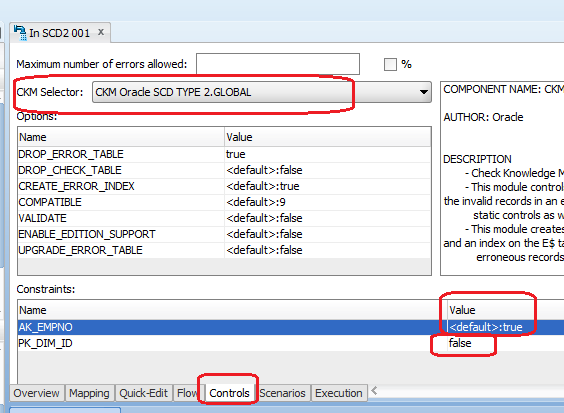
But we need to Consider Source table SK as for our Flow Control UK. We need to Add  Natural Key (Alternate Key)  for EMPNO at SCD2 table and We need to disable SK in Control Tab.

Step2:
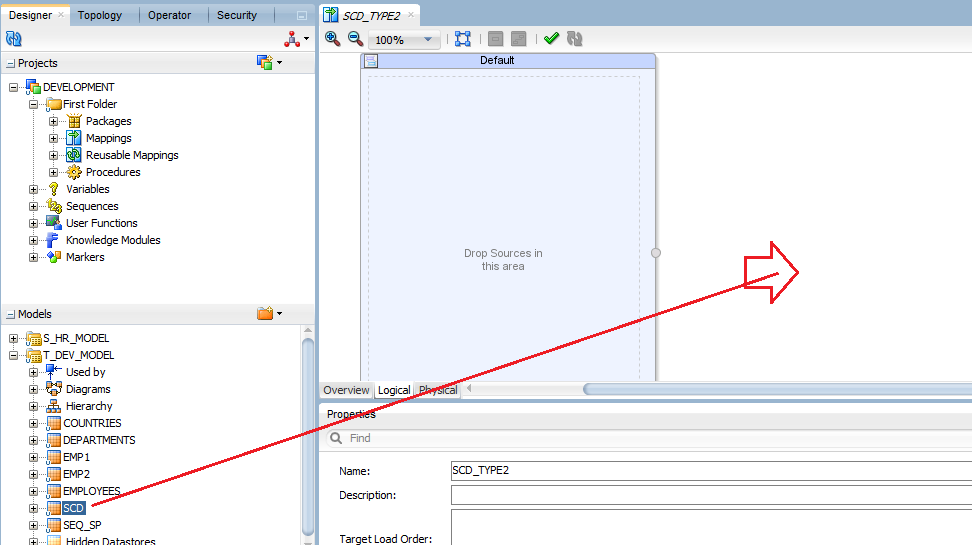
Adding Alternate Key at Model level for EMPNO column SCD2 Table.


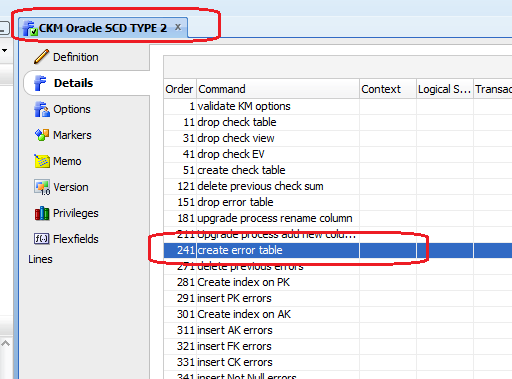
Step3:  Changing CKM Oracle KM Creating Error Table Step and Saving as new KM
CKM Oracle SCD2


SCD Type 2 Table Structure.

CREATE TABLE SCD2
  (
    DIM_EMP_ID        NUMBER,  --- 
Surrogate Key                                    
    EMPNO                   NUMBER(4, 0) , ----
Natural Key                           
    ENAME                   VARCHAR2(10 BYTE) , -----
Overwrite On Change                            
    JOB                          VARCHAR2(9 BYTE) ,---
Overwrite On Change                                      
    MGR                        NUMBER(4, 0) ,   ----
Overwrite On Change                                       
    HIREDATE             DATE ,                 -- 
Overwrite On Change                                       
    SAL                          NUMBER(7, 2) ,  --- 
Add Row On Change                                       
    COMM                    NUMBER(7, 2) ,   ---  
Add Row On Change                                    
    DEPTNO                 NUMBER(2, 0) ,  ---- 
Overwrite On Change                                        
    FLAG_STATUS     VARCHAR2(1 BYTE) ,---
Current Record Flag                                            
    START_DATE        DATE , ---     
Starting Timestamp                                        
    END_DATE            DATE, ---       Ending
Timestamp    
    PRIMARY KEY(DIM_EMP_ID)                    
  );


While Inserting Primary Key errors it got changed to Insert AK errors. we can see the
column got changed from DIM_EMP_ID to EMPNO.

insert into TARGET."E$_17022SCD2"
(
    ODI_PK,
    ODI_SESS_NO,
    ODI_ROW_ID,
    ODI_ERR_TYPE,
    ODI_ERR_MESS,
    ODI_ORIGIN,
    ODI_CHECK_DATE,
    ODI_CONS_NAME,
    ODI_CONS_TYPE,
    EMPNO,
    ENAME,
    JOB,
    MGR,
    HIREDATE,
    SAL,
    COMM,
    DEPTNO,
    FLAG_STATUS,
    START_DATE,
    END_DATE
)
select    SYS_GUID(),
    17022,
    rowid,
    'F',
    'ODI-15063: The alternate key AK_EMPNO is not unique.',
    '(5022)DEV.In SCD2 001',
    sysdate,
    'AK_EMPNO',
    'AK',   
    SCD2.EMPNO,
    SCD2.ENAME,
    SCD2.JOB,
    SCD2.MGR,
    SCD2.HIREDATE,
    SCD2.SAL,
    SCD2.COMM,
    SCD2.DEPTNO,
    SCD2.FLAG_STATUS,
    SCD2.START_DATE,
    SCD2.END_DATE
from    TARGET."I$_17022SCD2"   SCD2
where    exists  (
        select    SUB.EMPNO
        from     TARGET."I$_17022SCD2" SUB
        where     SUB.EMPNO=SCD2.EMPNO
        group by     SUB.EMPNO
        having     count(1) > 1
        )


NOTE: If you are using CKM SQL or CKM Sybase IQ  or CKM Teradata or other than Oracle CKM
we need follow this additional Steps for deleting Error records from E$table script.

Step1:  Enable  UD1 for Alternate Key or Natural Key ( EMPNO).


Step2: Open CKM SQL or Sybase or any other than Oracle

Open=> Delete errors from controlled table step


Change below UK and PK values to UD1 and AK


UK to UD1 and PK to AK


Saturday, 2 August 2014

How To Change Slowly Changing Dimension Behavour in All Columns at a time other than Column=>Description tab

How To Change Slowly Changing Dimension Behavior in All Columns at a time other than Column=>Description tab


One of my friend asked me this SCD  Behavior changes in ODI 11G.  12C SCD Behavor changes at column level is very easy. We can Open table and change at column level directly. But in 11G We have to go for individual column and Description tab and need to change SCD Behavior.

In He project almost all  Dimension tables having  more than 200 Columns. It is very difficult to go to individual column=>description Tan and changing the SCD Behavior.

Here is an example for SCD Behavor changes at Repository Table Level.

Step1:  All Your Model tables we can find Work Repository Tables.

SNP_TABLE:  All your tables
SNP_COL: All columns

Step2:  Using Below query we can find the all columns for SCD2 table.

Default SCD_COL_TYPE value will be null.  Whenever we are changing the Column SCD behavior it will update the value in this column as below values.


SCD_COL_TYPE SCD Meaning
SK Surrogate Key
NK Natural Key
OC Overwrite On Change
IRAdd Row On Change
OCOverwrite On Change
CRCurrent Record Flag
STStarting Timestamp
ETEnding Timestamp

SELECT   
SNP_COL.COL_NAME, 
SNP_TABLE.TABLE_NAME, 
SNP_COL.SCD_COL_TYPE
FROM SNP_COL col,
  SNP_TABLE tab
WHERE tab.i_table=col.i_table
AND table_name   ='SCD2';


Step3: SCD2 TABLE Structure:

 CREATE TABLE SCD2
  (
    DIM_EMP_ID        NUMBER,  --- 
Surrogate Key                                    
    EMPNO                   NUMBER(4, 0) , ----
Natural Key                           
    ENAME                   VARCHAR2(10 BYTE) , -----
Overwrite On Change                            
    JOB                          VARCHAR2(9 BYTE) ,---
Overwrite On Change                                      
    MGR                        NUMBER(4, 0) ,   ----
Overwrite On Change                                       
    HIREDATE             DATE ,                 -- 
Overwrite On Change                                       
    SAL                          NUMBER(7, 2) ,  --- 
Add Row On Change                                       
    COMM                    NUMBER(7, 2) ,   ---  
Add Row On Change                                    
    DEPTNO                 NUMBER(2, 0) ,  ---- 
Overwrite On Change                                        
    FLAG_STATUS     VARCHAR2(1 BYTE) ,---
Current Record Flag                                            
    START_DATE        DATE , ---     
Starting Timestamp                                        
    END_DATE            DATE ---       Ending
Timestamp                        
  );


Using Below Query We can Change the Above SCD Behavior.

UPDATE SNP_COL
SET SCD_COL_TYPE='OC'
WHERE COL_NAME in ('ENAME','JOB','MGR','HIREDATE','DEPTNO')
AND I_TABLE= (SELECT I_TABLE FROM SNP_TABLE WHERE TABLE_NAME='SCD2');


COMMIT;


 UPDATE SNP_COL
SET SCD_COL_TYPE='IR'
WHERE COL_NAME in ('COMM','SAL')
AND I_TABLE= (SELECT I_TABLE FROM SNP_TABLE WHERE TABLE_NAME='SCD2');


COMMIT;


 UPDATE SNP_COL
SET SCD_COL_TYPE='SK'
WHERE COL_NAME in ('DIM_EMP_ID')
AND I_TABLE= (SELECT I_TABLE FROM SNP_TABLE WHERE TABLE_NAME='SCD2');


COMMIT;


 UPDATE SNP_COL
SET SCD_COL_TYPE='NK'
WHERE COL_NAME in ('EMPNO')
AND I_TABLE= (SELECT I_TABLE FROM SNP_TABLE WHERE TABLE_NAME='SCD2');


COMMIT;


 UPDATE SNP_COL
SET SCD_COL_TYPE='CR'
WHERE COL_NAME in ('FLAG_STATUS')
AND I_TABLE= (SELECT I_TABLE FROM SNP_TABLE WHERE TABLE_NAME='SCD2');


COMMIT;


UPDATE SNP_COL
SET SCD_COL_TYPE='ST'
WHERE COL_NAME in ('START_DATE')
AND I_TABLE= (SELECT I_TABLE FROM SNP_TABLE WHERE TABLE_NAME='SCD2');


COMMIT;


UPDATE SNP_COL
SET SCD_COL_TYPE='ET'
WHERE COL_NAME in ('END_DATE')
AND I_TABLE= (SELECT I_TABLE FROM SNP_TABLE WHERE TABLE_NAME='SCD2');


COMMIT;


Compare to 11G, 12C 12.1.2 or 12.1.3 very easy for changing SCD Behavior


Wednesday, 2 July 2014

ODI 12c SCD Type 2 Step by Step Implementation

ODI 12c SCD Type 2 is very easy compare to ODI 11G.

Please find the below steps for SCD Type 2 implementation.

I have created new target table to support SCD behaviour.

CREATE TABLE DEV.SCD
  (
    EMPLOYEE_ID           NUMBER(6,0),
    FIRST_NAME             VARCHAR2(20 BYTE),
    LAST_NAME              VARCHAR2(25 BYTE) NOT NULL ENABLE,
    EMAIL                         VARCHAR2(25 BYTE) NOT NULL ENABLE,
    PHONE_NUMBER     VARCHAR2(20 BYTE),
    HIRE_DATE                DATE NOT NULL ENABLE,
    JOB_ID                       VARCHAR2(10 BYTE) NOT NULL ENABLE,
    SALARY                     NUMBER(8,2),
    COMMISSION_PCT NUMBER(2,2),
    MANAGER_ID           NUMBER(6,0),
    DEPARTMENT_ID     NUMBER(4,0),
    STATUS_FLAG          VARCHAR2(1 BYTE),
    STARTING_DATE      DATE,
    ENDING_DATE          DATE
  )  TABLESPACE SYSTEM ;


Step1:
------
Import IKM Oracle Slowly Changing Dimension  Knowledge module.


Step2:
--------
Open Target SCD table and Change the SCD Behavior.


I have select SCD Behavior like below options.


Step3:
-------
Creating Mapping for Loading the data from Source table (hr.employees) table to
target table (dev.scd).


These three columns we are not receiving from Source , we need to map at direct target table


I have done mapping STATUS_FLAG=1 ( Default Active-1, Inactive-0),
STARTING_DATE=SYSDATE ,
ENDING_DATE = SYSDATE( But it will take default value from IKM SCD as 01-01-2400.


Selecting LKM SQL to SQL Knowledge module in Physical Tab


Selecting IKM Oracle Slowly Changing Dimension Knowledge Module 


Selecting CKM SQL knowledge module for Data Quality validation at I$table.


Running Interface using Run button in Top Menu


Target table is empty as of now there is not records in target SCD table.


Program executed successfully. We can see the status as Green  .


110 records are inserted as STATUS_FLAG=1 as New Records or active records.


UPDATE hr.employees SET salary=77777 WHERE employee_id=100;

COMMIT;

I have update data in source table and again i am running my mapping.


Program finished successfully.


One record got inserted as salary got changed it will Add row on change behavior


We can see the modified record inserted as new records and old record updated STATUS_FLAG=0
inactive record.  STATUS-FLAG=1 is active for new records.


Saturday, 26 May 2012

Slowly Changing Dimensions in odi

Slowly Changing Dimensions
Type 2 Slowly Changing Dimension (SCD) is a strategy used for loading data warehouses. It is often used for loading dimension tables, in order to keep track of changes on specific columns. A typical slowly changing dimension table would contain the flowing columns:
  • A surrogate key. This is usually a numeric column containing an automatically-generated number (using an identity column, a rank function or a sequence).
  • A natural key. This is the list of columns that represent the primary key of the operational system.
  • Columns that one must overwritten on change.
  • Columns that require to add row on change.
  • A starting timestamp column indicating when the record was created in the data warehouse
  • An ending timestamp column indicating when the record became obsolete (closing date)
  • A current record flag indicating whether the record is the actual one (1) or an old one (0)
The following example illustrate the Slowly Changing Dimension behavior.
In the operational system, a product is defined by its ID that acts as a primary key. Every product has a name, a size, a supplier and a family. In the Data Warehouse a new version of this product is stored whenever the supplier or the family is updated in the operational system.
Figure 6-1 Type 2 Slow Changing Dimensions Example
Description of Figure 6-1 follows
Description of "Figure 6-1 Type 2 Slow Changing Dimensions Example"
In this example, the product dimension is first initialized in the Data Warehouse on March 12, 2006. All the records are inserted and are assigned a calculated surrogate key as well as a fake ending date set to January 1, 2400. As these records represent the current state of the operational system, their current record flag is set to 1. After the first load, the following changes happen in the operational system:
  1. The supplier is updated for product P1
  2. The family is updated for product P2
  3. The name is updated for product P3
  4. Product P5 is added
These updates have the following impact on the data warehouse dimension:
  • The update of the supplier of P1 is translated into the creation of a new current record (Surrogate Key 5) and the closing of the previous record (Surrogate Key 1)
  • The update of the family of P2 is translated into the creation of a new current record (Surrogate Key 6) and the closing of the previous record (Surrogate Key 2)
  • The update of the name of P3 simply updates the target record with Surrogate Key 3
  • The new product P5 is translated into the creation of a new current record (Surrogate Key 7).
To create a Knowledge Module that implements this behavior, it is necessary to know which columns act as a surrogate key, a natural key, a start date etc. Oracle Data Integrator stores this information in Slowly Changing Dimension Behavior field in the Description tab for every column in the model.
When populating such a datastore in an interface, the IKM has access to this metadata using the SCD_xx selectors on the getColList() substitution method.
The way Oracle Data Integrator implements Type 2 Slowly Changing Dimensions is described below:
  1. Drop (if it exists) and create the integration table in the staging area.
  2. Insert the flow data in the integration table using only mappings that apply to the natural key, overwrite on change and add row on change columns. Set the starting timestamp to the current date and the ending timestamp to a constant.
  3. Recycle previous rejected records
  4. Call the CKM to perform a data quality check on the flow
  5. Flag the records in the integration table to 'U' when the natural key and the add row on change columns have not changed compared to the current records of the target.
  6. Update the target with the columns flagged overwrite on change by using the integration table content filtered on the 'U' flag.
  7. Close old records - those for which the natural key exists in the integration table, and set their current record flag to 0 and their ending timestamp to the current date
  8. Insert the new changing records with their current record flag set to 1
  9. Drop the integration table.
Again, this approach can be adapted. There may be some cases where the SQL produced requires further tuning and optimization.